coNnectUS Developer Guide
Acknowledgements
This brownfield project is built upon the AddressBook-Level3 project created by the SE-EDU initiative. We have used JavaFX for the GUI, Jackson for JSON format manipulation and JUnit for writing and performing tests. This site is built using Markbind and the diagrams within it are created using PlantUML.
In addition, we also adapted this solution to configure opening this User Guide's URL in UserGuideAccessWindow.
AI Usage
- @shijieteo — Identifying singleton design pattern in
PersonComparatorFactory, modifying CSS/Ui elements to include tag colors, tag legend and writing of test cases. - @RyanNgCT — Modifying the behavior of GUI elements in the migration of
HelpWindowtoUserGuideAccessWindow, scaffolding the architecture for Alias Storage (and its sub-components), first-pass scanning of PRs in code reviews (flagged nits and issues are subject to my scrutiny and evaluation) and writing of test cases. - @draxche — Clarifying of logic for deleting tag instances in
DeleteCommand, checking and rectifying of edge cases (i.e. dealing with whitespace in argument parsing), idea generation for documentation, writing of test cases. - @Alloyshoes — Bug testing, ensuring code conformance to Java/Git standards, writing of test cases.
- @idealfarhand — Bug testing, code refactoring, implementation idea generation and writing of test cases.
Setting up, getting started
Refer to the guide Setting up and getting started.
Design
Architecture
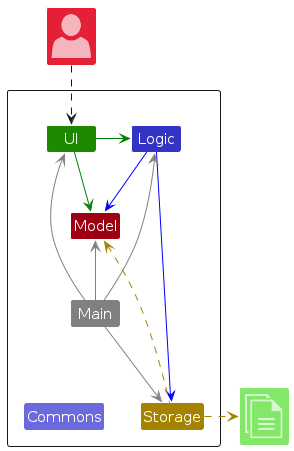
The Architecture Diagram given above explains the high-level design of the App.
The following provides a quick overview of the main components and their interactions.
Main components of the architecture
Main (consisting of classes Main and MainApp) is in charge of the app launch and shut down.
- At app launch, it initializes the other components in the correct sequence, and connects them up with each other.
- At shut down, it shuts down the other components and invokes cleanup methods where necessary.
The bulk of the app's work is done by the following four components:
UI: The UI of the App.Logic: The command executor.Model: Holds the data of the App in memory.Storage: Reads data from, and writes data to, the hard disk.
Commons represents a collection of classes used by multiple other components.
How the architecture components interact with each other
The Sequence Diagram below shows how the components interact with each other for the scenario where the user issues the command delete 1.
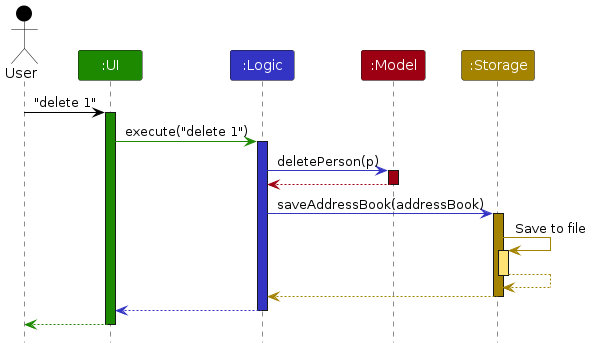
Each of the four main components (also shown in the diagram above),
- defines its API in an
interfacewith the same name as the Component. - provides its functionality through a concrete
{Component Name}Managerclass that implements the corresponding API interface.
For example, the Logic component defines its API in Logic.java and implements it in LogicManager.java. Other components interact with a component through its interface rather than its concrete class, preventing them from coupling to that component's implementation, as illustrated in the following partial class diagram.
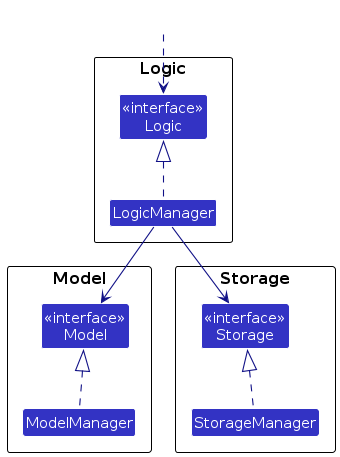
The sections below give more details of each component.
UI component
The API of this component is specified in Ui.java
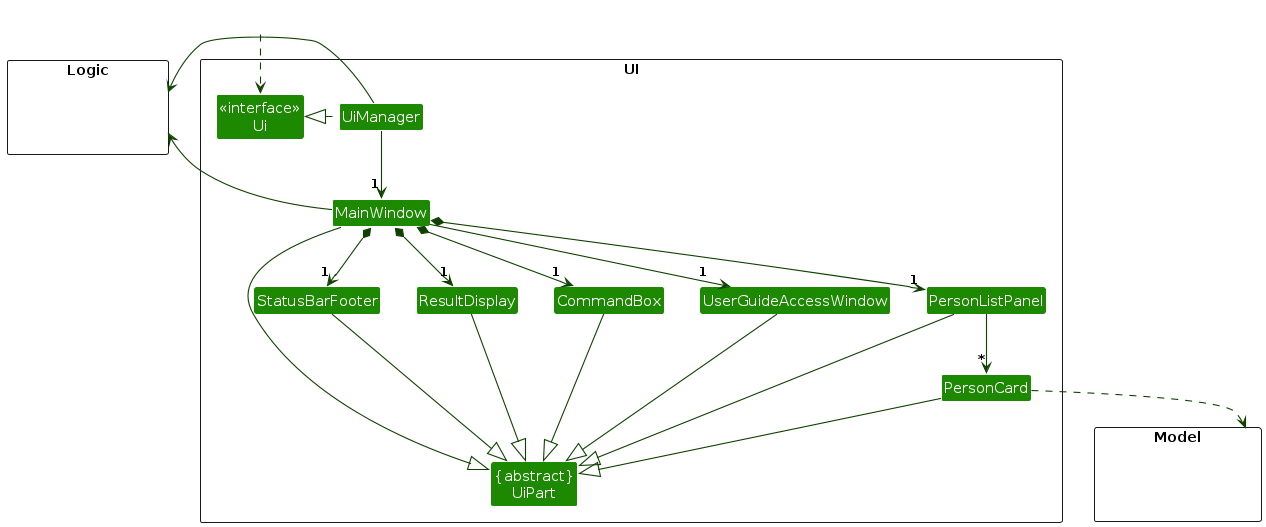
The UI consists of a MainWindow and its parts, such as CommandBox, ResultDisplay, PersonListPanel, and StatusBarFooter. All of these, including MainWindow, inherit from the abstract UiPart class, which captures common behavior among classes that represent visible GUI parts.
The UI component uses the JavaFX UI framework. The layouts of these UI parts are defined in matching .fxml files in src/main/resources/view. For example, MainWindow.fxml specifies the layout of MainWindow.
The UI component,
- executes user commands using the
Logiccomponent. - listens for changes to
Modeldata so that the UI can be updated with the modified data. - keeps a reference to the
Logiccomponent, because theUIrelies on theLogicto execute commands. - depends on some classes in the
Modelcomponent because it displaysPersonobjects from the model.
Logic component
API : Logic.java
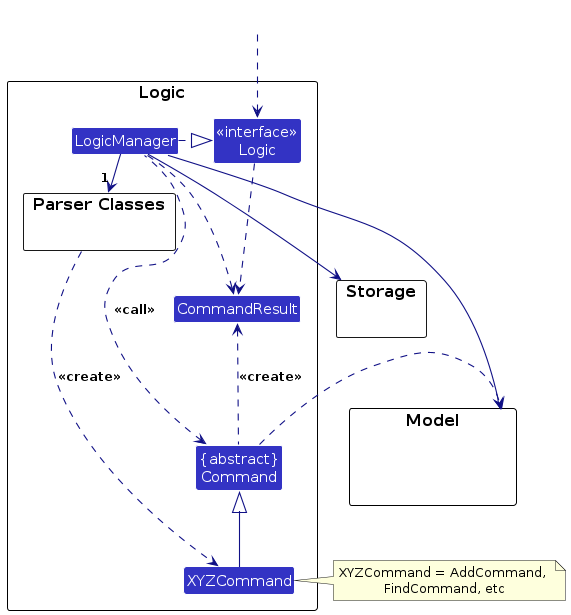
Here's a (partial) class diagram of the Logic component:
The sequence diagram below illustrates the interactions within the Logic component, taking execute("delete 1") API call as an example.
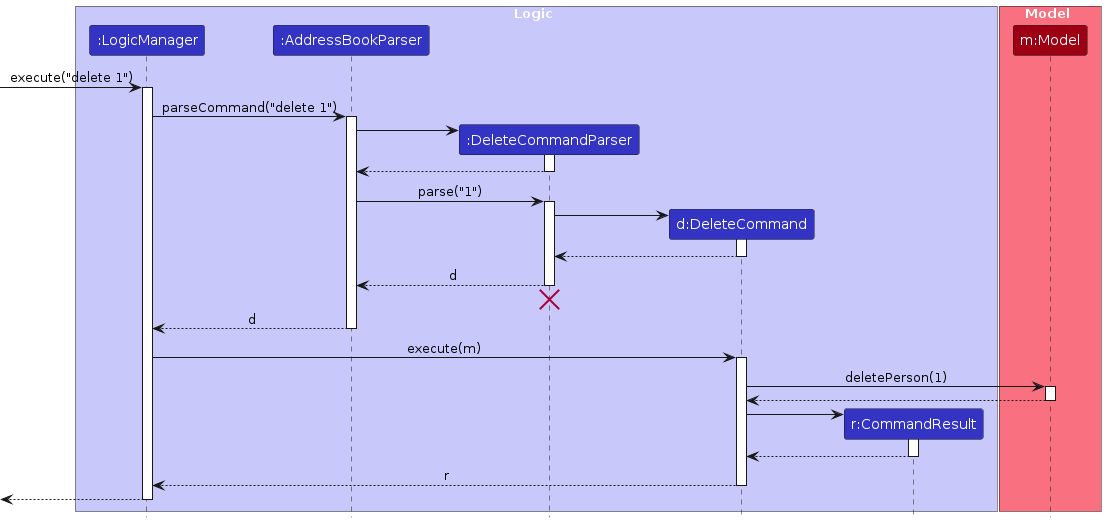
Note: The lifeline for DeleteCommandParser should end at the destroy marker (X), but due to a limitation of PlantUML, the lifeline continues till the end of diagram.
How the Logic component works:
- When
Logicis called upon to execute a command, the command is passed to anAddressBookParserobject, which in turn creates a parser that matches the command (e.g.,DeleteCommandParser) and uses it to parse the command. - This results in a
Commandobject (more precisely, an object of one of its subclasses e.g.,DeleteCommand) which is executed by theLogicManager. - The command can communicate with the
Modelwhen it is executed (e.g. to delete a person).
Note that although this is shown as a single step in the diagram above for simplicity, the code can require several interactions between the command object and theModelto complete the operation. - The result of the command execution is encapsulated as a
CommandResultobject which is returned fromLogic.
Here are the other classes in Logic (omitted from the class diagram above) that are used for parsing a user command:
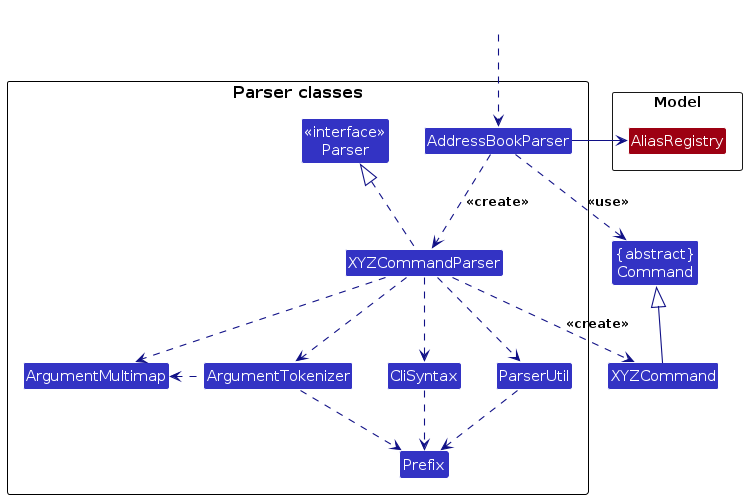
How the parsing works:
- When called upon to parse a user command, the
AddressBookParserclass creates anXYZCommandParser(XYZis a placeholder for the specific command name, e.g.,AddCommandParser). The parser uses the other classes shown above to parse the user command and create anXYZCommandobject (e.g.,AddCommand). TheAddressBookParserreturns that object as aCommandobject. - All
XYZCommandParserclasses, such asAddCommandParserandDeleteCommandParser, implement theParserinterface so they can be treated similarly where appropriate, for example during testing.
Model component
API : Model.java
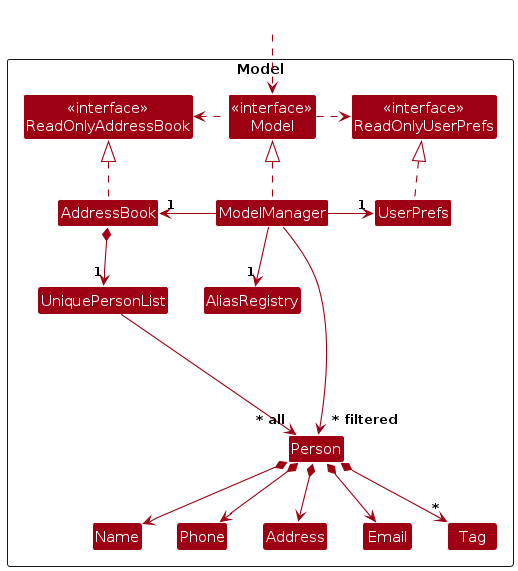
The Model component,
- stores the address book data i.e., all
Personobjects (which are contained in aUniquePersonListobject). - stores the
Personobjects selected by the current filter, such as search results, in a separate filtered list. It exposes this list as an unmodifiableObservableList<Person>that the UI can observe and bind to, so the UI updates when the list changes. - keeps a history of address book states in a
VersionedAddressBook, so that changes can be undone and redone (see Undo/redo feature). - stores a
UserPrefsobject that represents the user’s preferences (currently, just the GUI settings). This is exposed to the outside as aReadOnlyUserPrefsobject. - does not depend on any of the other three components (as the
Modelrepresents data entities of the domain, they should make sense on their own without depending on other components). - stores alias-to-command-word mappings in an
AliasRegistry, exposing operations to register, delete and retrieve aliases. Alias mappings are maintained independently from the address book’s undo/redo history.
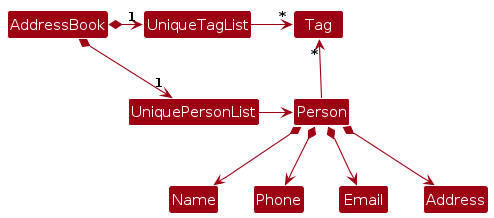
Note: The alternative, arguably more object-oriented, design below keeps a unique list of tags in AddressBook, and each Person references tags from that list. This lets AddressBook maintain one Tag object per unique tag instead of each Person holding its own Tag objects.
Storage component
API : Storage.java
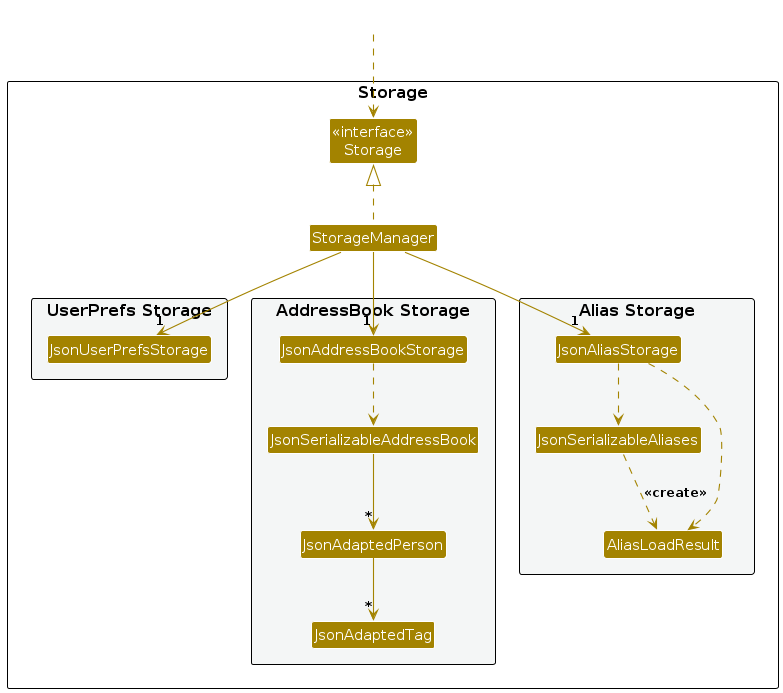
The Storage component,
- can save address book data, alias data and user preference data in the JSON format, and read them back into corresponding objects.
- is implemented by
StorageManager, which delegates the actual JSON file access toJsonAddressBookStorage,JsonUserPrefsStorageandJsonAliasStorage(one class per data file). - depends on some classes in the
Modelcomponent (because theStoragecomponent's job is to save/retrieve objects that belong to theModel). - uses
AliasLoadResultto bundleAliasRegistrywith warnings for skipped alias entries.MainAppuses this result to initialize the model and generate startup warnings.
Common classes
Classes used by multiple components are in the seedu.address.commons package.
Implementation
This section describes some noteworthy details on how certain features are implemented.
Dark and light themes
The user can switch between an OLED dark theme and a light theme with theme dark / theme light, or with the theme button in the menu bar.
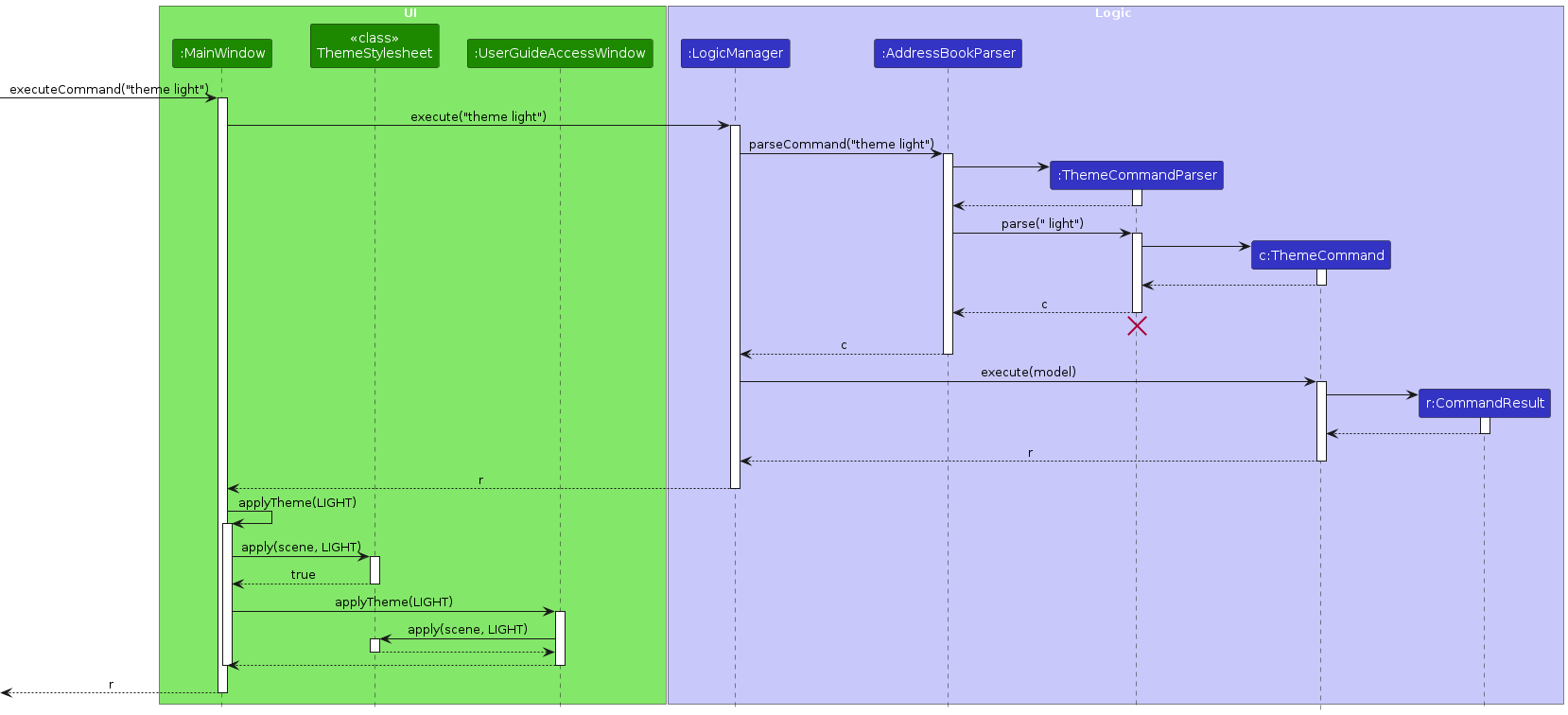
The colors are split across two kinds of stylesheets in src/main/resources/view. Base.css, Extensions.css and UserGuideAccessWindow.css hold all the style rules, but use color placeholders (e.g. theme-bg, theme-text) instead of actual colors. DarkTheme.css and LightTheme.css only define the color of each placeholder. Switching themes swaps this one palette stylesheet.
The theme feature,
- uses
ThemeCommand, which returns aCommandResultcarrying the requestedThemeinstead of changing theModel, the same wayexitasks the UI to close the app. - uses
ThemeStylesheetto swap the palette stylesheet of bothMainWindowandUserGuideAccessWindow, so the two windows always match. - uses the same
MainWindow#applyTheme(...)method for both the command and the button. - keeps the current theme and shows an error message if the stylesheet of the new theme cannot be found.
- saves the theme in
GuiSettings, which is written topreferences.jsonon exit. If no theme is saved,Theme.DARKis used.
Finding contacts
Users can search for contacts by supplying one or more criteria, such as name, phone number, email address, address or tags.
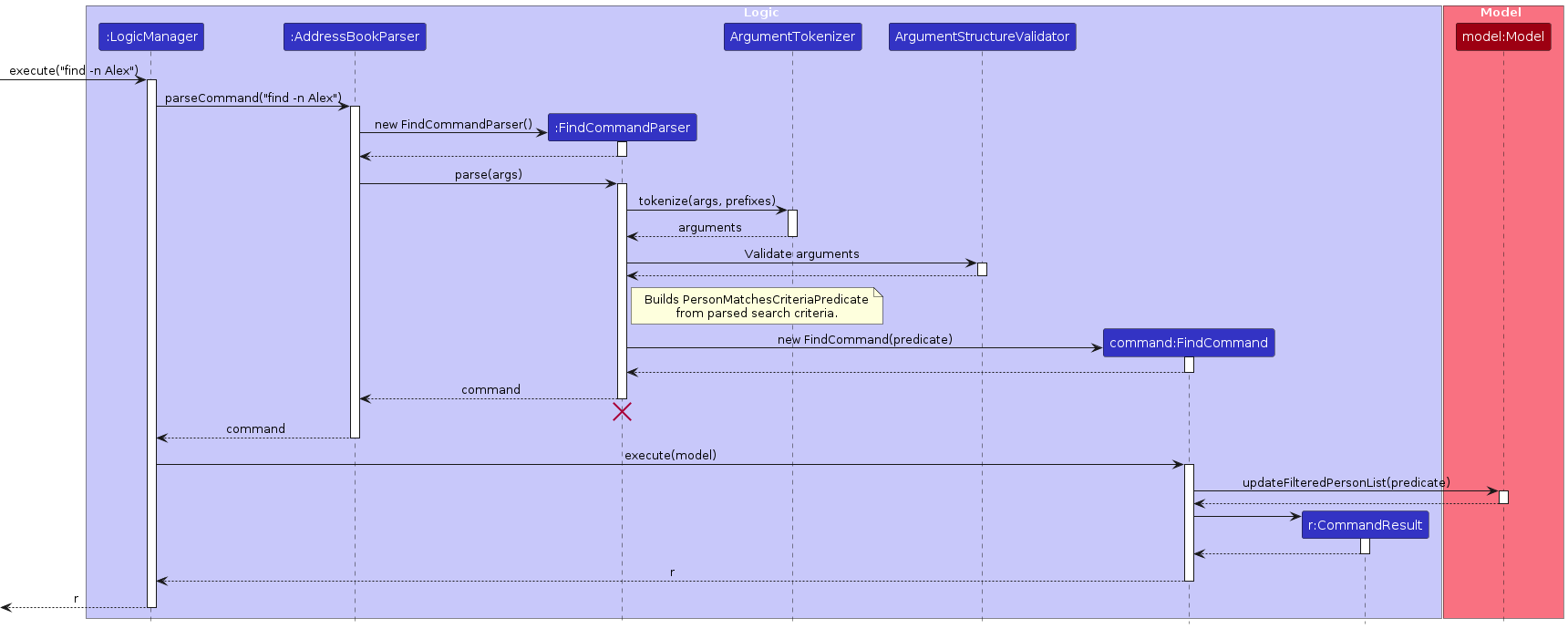
The find feature:
- uses
FindCommandParserwithArgumentTokenizerto separate the search arguments into prefixes and values. - uses
ArgumentStructureValidatorto reject unknown parameters, text before the first prefix, empty values and repeated non-tag parameters. Tag parameters can be repeated as search criteria. - creates a
PersonMatchesCriteriaPredicatefrom the parsed search criteria, requiring all supplied criteria to match. - passes the predicate to
FindCommand, which updates the filtered contact list in theModel.
Sorting contacts
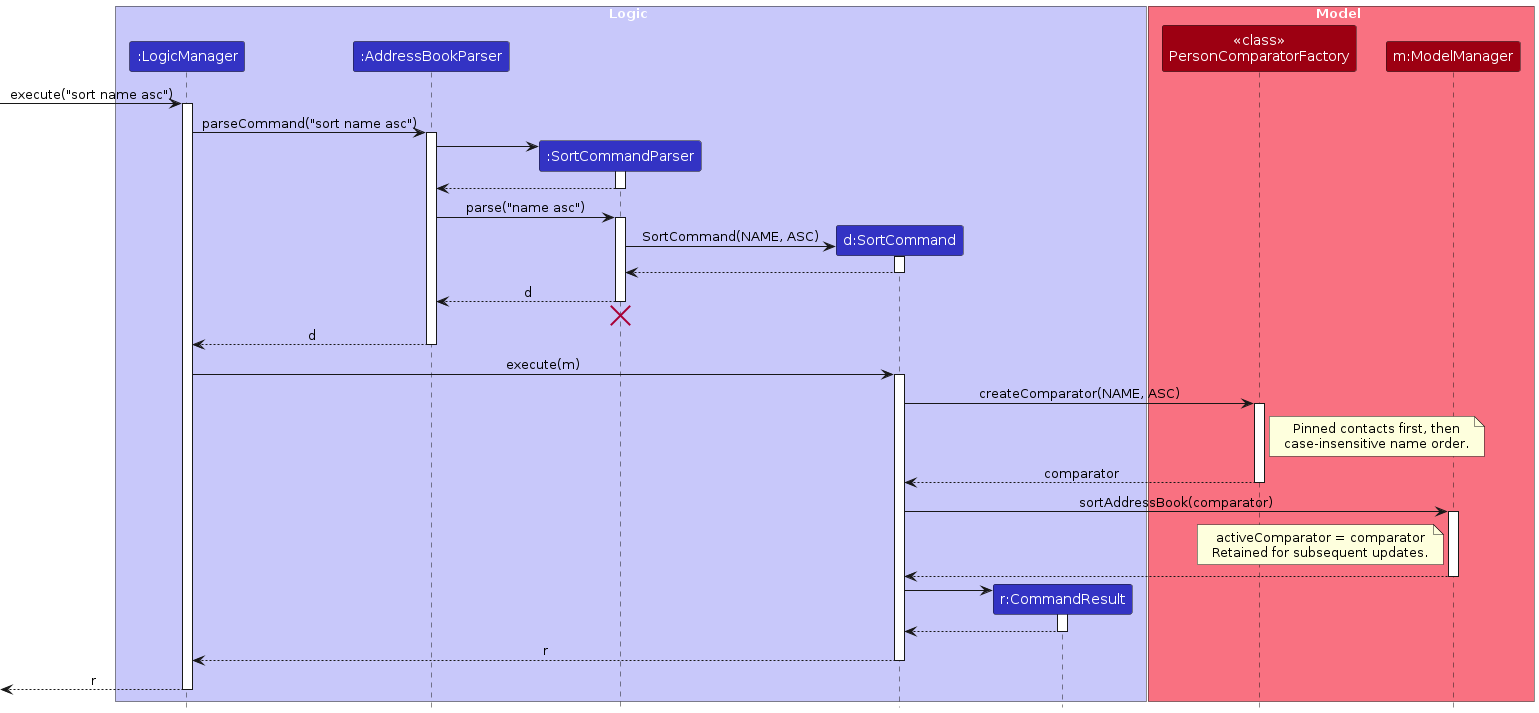
Users are able to sort their contacts such as by name and by their phone numbers.
The sort feature makes use of the PersonComparatorFactory class to create comparators for the various sorts.
PersonComparatorFactoryprovidescreateComparator(SortCriteria, SortOrder)to create the various comparators required to achieve the sorts.PersonComparatorFactoryalso has a privateSortComparatorclass with the intention to overrideequals()to provide a more accurate equality check.- Ensuring
equals()is accurate is needed to preventundo/redoloops associated withsort.
- Ensuring
PersonComparatorFactoryalso adopts the singleton design pattern for the default comparator (for pinned persons sorting) to ensureequals()is correct for it.- To ensure that user applied sorts are maintained,
ModelManagerstores the most recent comparator used asactiveComparatorModelManagerwill callsortAddressBookinternally after any change to the contacts such as adding or removing contacts
Pinning a contact
Users are able to pin contacts, placing them above other unpinned contacts.
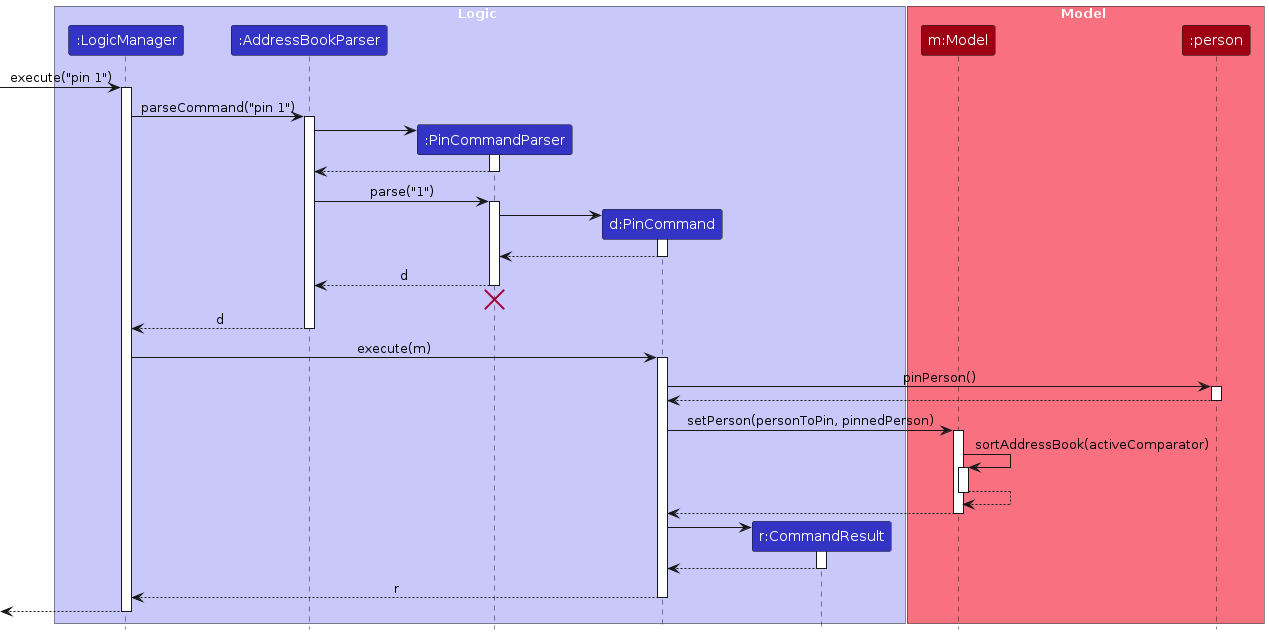
The pin feature makes use of sorting to ensure pinned contacts are displayed on top of unpinned contacts.
- The default sorting method from
PersonComparatorFactorysorts persons by their pinned status. - This sorts the list according to pinned status first, followed by the sorting method previously set by the user (such as by Name).
As for unpinning a contact, the only difference is using unpinPerson() instead of pinPerson().
Bulk deletion by tags
Contacts have tags, and users can remove specified tags from all contacts using delete -t TAG_CATEGORY TAG_NAME.... Contacts whose entire non-empty tag set is covered by the specified tags are deleted.
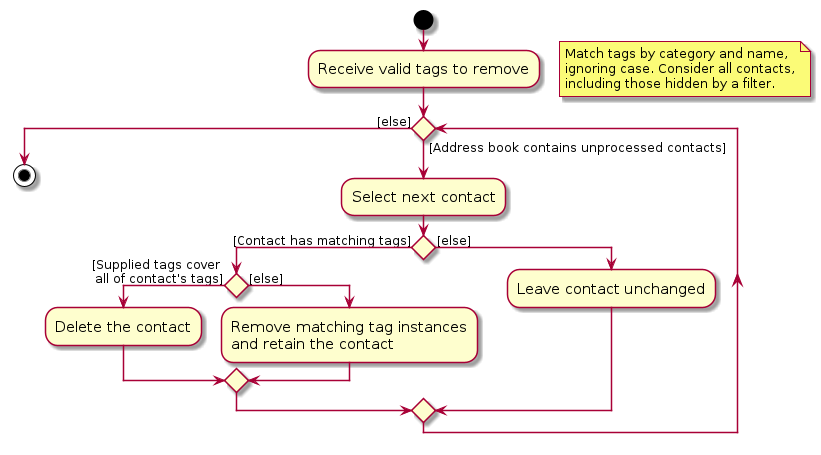
The bulk deletion feature:
- matches tags by category and name, ignoring case.
- considers all contacts in the address book, including those hidden by the current filter.
- deletes a contact if the supplied tags cover all of its existing tags. Additional supplied tags do not prevent deletion.
- removes matching tags from each contact and retains the contact if at least one of its tags remains.
- leaves contacts with no matching tags unchanged, including contacts that initially have no tags.
Registering an alias for a command
Users are able to register aliases for commands, enabling a more customized experience when using coNnectUS.
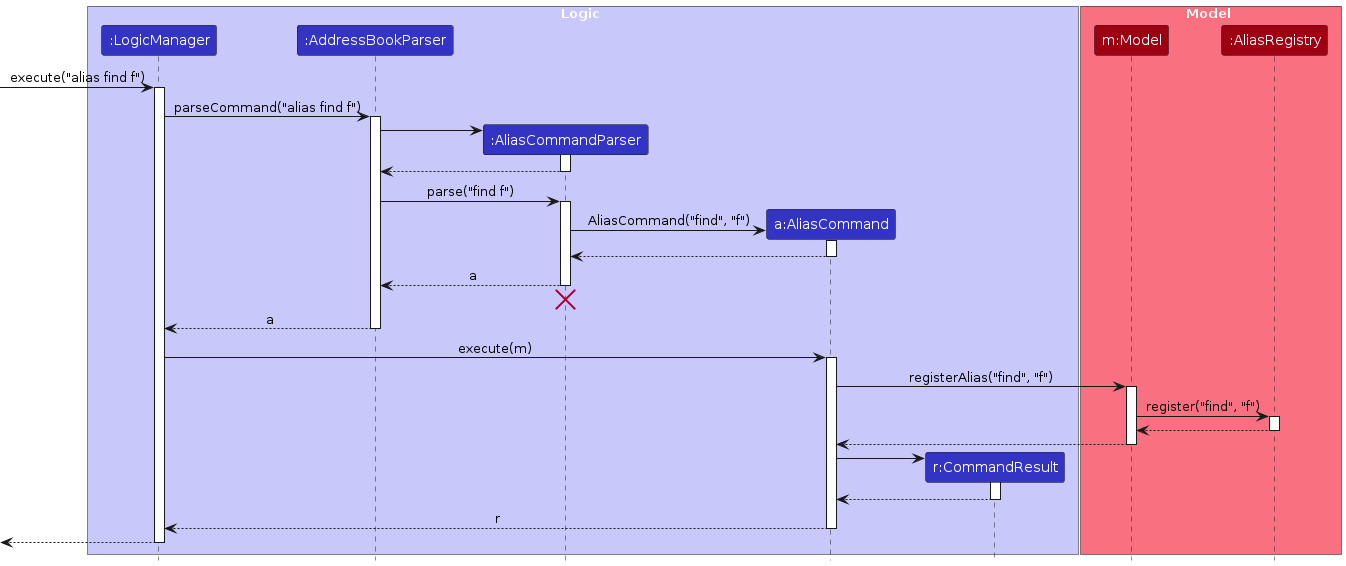
The sequence diagram above illustrates the successful execution of
alias find f, before the alias f can be used in place of find.
The alias feature:
- maintains alias-to-command-word mappings in
AliasRegistry. - delegates registration through
Model#registerAlias()toAliasRegistry#register(), which validates the registration and stores the alias-to-command-word mapping. - requires
aliasto consist of one or more lowercase or uppercase ASCII letters (i.e.a-zorA-Z), with no whitespace. - treats aliases as case-sensitive, allowing for names such as
fandFto be registered separately. - supports registration for built-in command words only, using an exact, case-sensitive match. Existing aliases cannot be used for the target command word.
- rejects alias names that conflict with either of the following:
- a built-in command word (using a case-insensitive comparison).
- an already registered alias (using a case-sensitive comparison).
- resolves an alias to its command word before parsing the target command's arguments. Argument values remain unchanged.
- saves the updated alias mappings through
LogicManagerand the storage component, so that successfully saved registrations persist across sessions, throughdata/aliases.json.
Using a registered alias
AddressBookParser uses the model’s AliasRegistry#resolve() to resolve command aliases before dispatching to the appropriate command parser. For example, f -n Alex resolves to find -n Alex, with the command's arguments passed to FindCommandParser.
User-supplied commands which are not registered aliases remain unchanged, preserving the built-in command handling and unknown-command error handling.
Important Note
When adding a new built-in command, add its COMMAND_WORD to CommandCatalog.BUILT_IN_COMMAND_WORDS so that aliases can be registered to it.
Deleting a particular alias
Users are able to remove previously registered alias entries that they do not require.
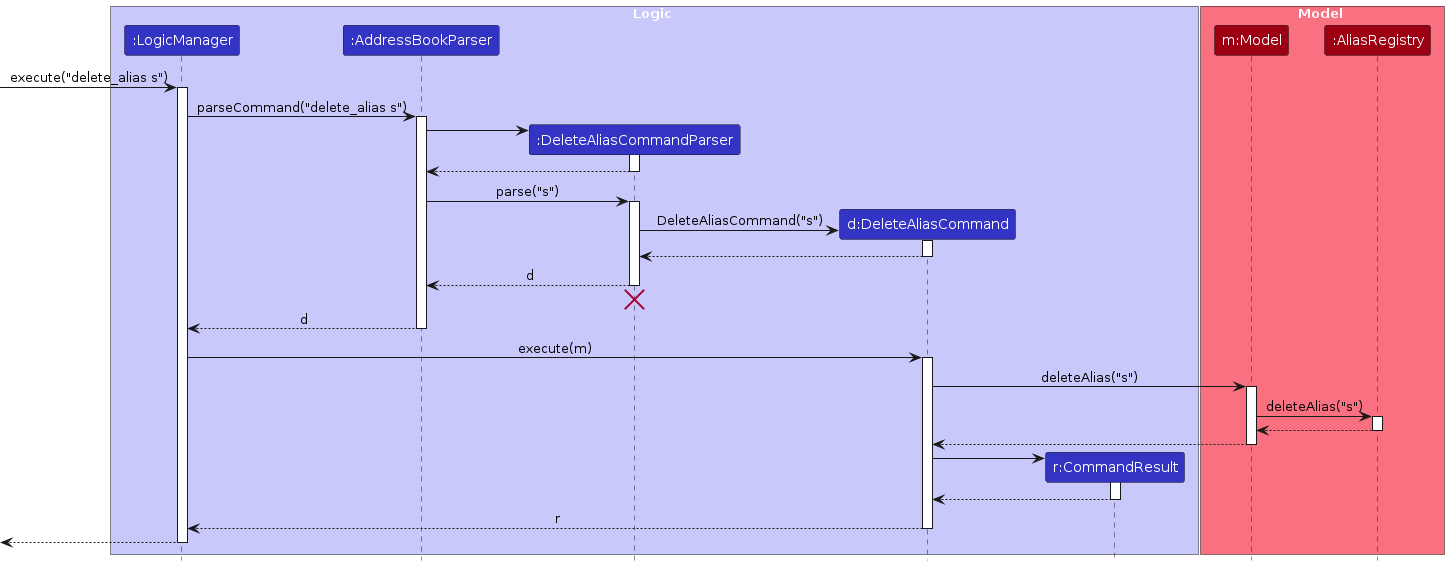
The sequence diagram above illustrates the successful execution of
delete_alias s, assuming that the user has previously registered s as an alias for sort.
The delete_alias feature:
- uses
DeleteAliasCommandParserto validate the alias is supplied before creating aDeleteAliasCommand. - delegates deletion through
Model#deleteAlias()toAliasRegistry#deleteAlias()and requires the alias to exist in theAliasRegistry, before deleting it. - treats alias names as case-sensitive, so deleting
fdoes not remove a separately registered alias namedF. - rejects an unregistered alias with an
IllegalArgumentException, whichDeleteAliasCommandconverts into aCommandExceptionfor display to the user. - saves the updated alias mappings through
LogicManagerand the storage component, so that successfully saved deletions persist across sessions.
Import feature
Users are able to merge a list of contacts from a .json file with their current contact list.
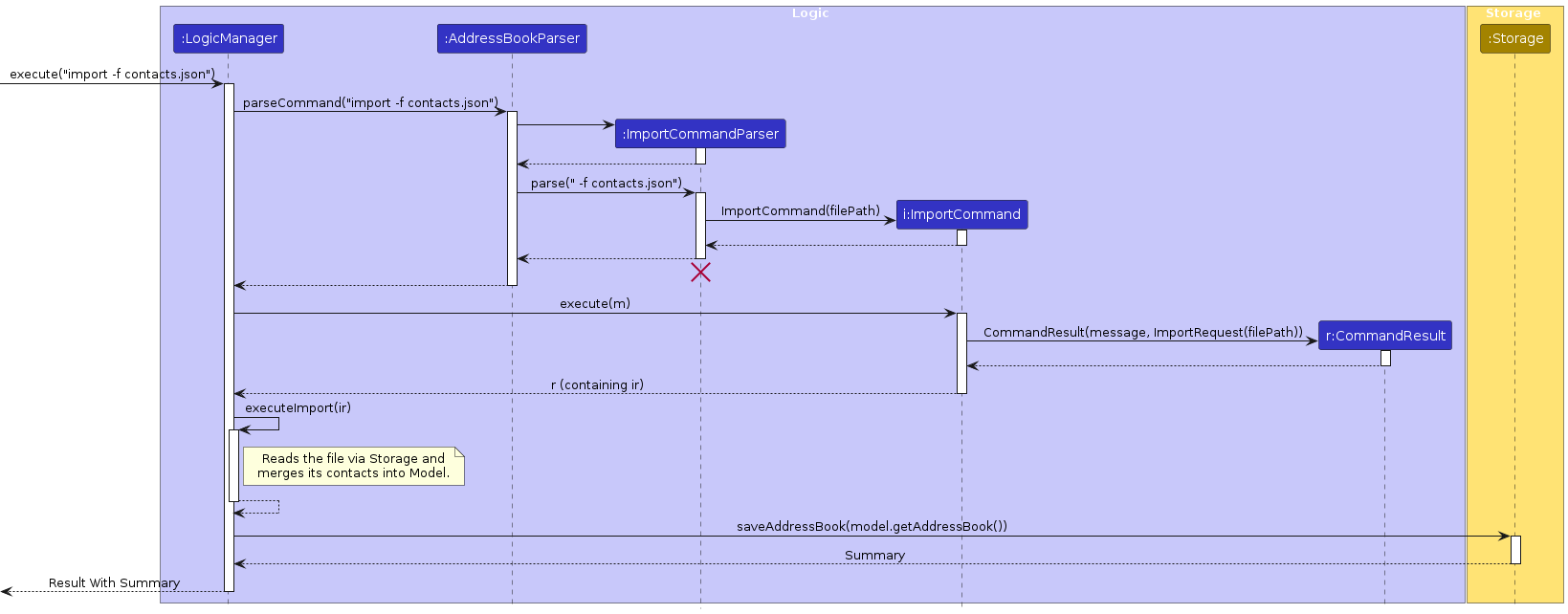
The above sequence diagram illustrates the successful execution of import -f contacts.json.
The import feature:
- uses
ImportCommandParserto validate a filepath is supplied before creating anImportCommand. ImportCommandcreates anImportRequestcontaining the path of file to be imported, wraps it in aCommandResult, and returns the result toLogicManager.LogicManagercallsexecuteImport(), which invokesStorageto read the file from the path provided.LogicManagerinvokesModelto merge the imported contacts with the current list of contacts.
Export feature
Users are able to save a list of contacts based on a set of criteria into a .json file.
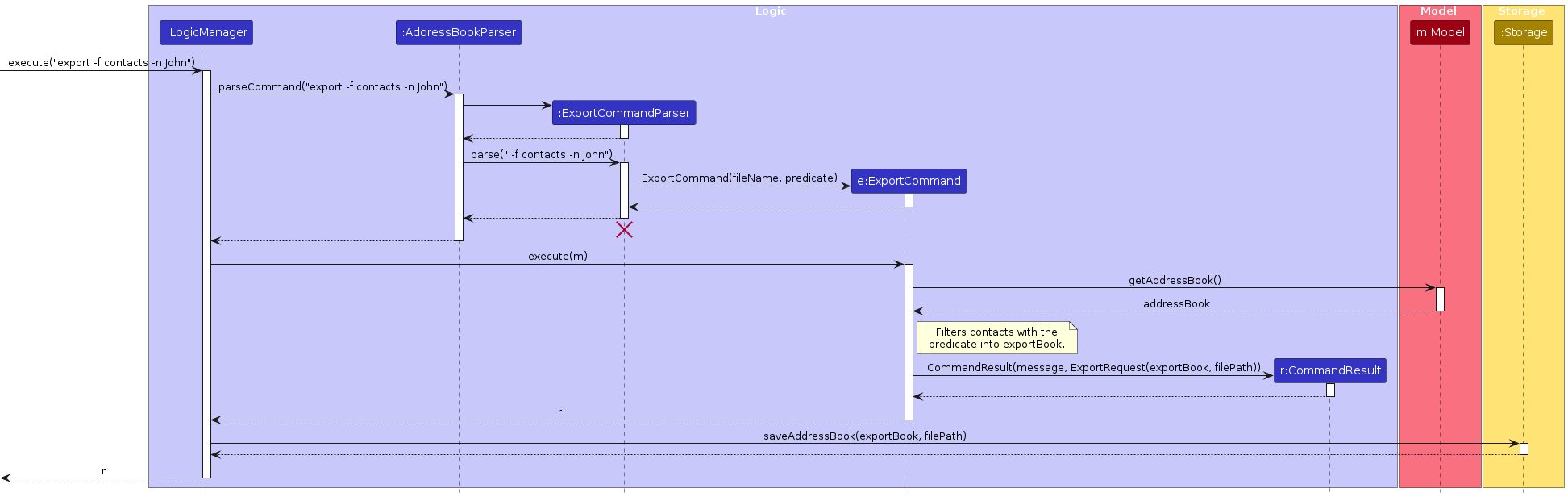
The above sequence diagram illustrates the successful execution of export -f contacts -n John.
The export feature:
ExportCommandParservalidates the filename and constructs a predicate, then passes both toExportCommand.ExportCommanduses the suppliedPredicateto retrieve the filtered list of contacts.ExportCommandcreates anExportRequestcontaining the output path and filtered contacts, wraps it in aCommandResult, and returns the result toLogicManager.LogicManagerinvokesStorageto save the filtered contacts to a file with the supplied filename.
Tags for contacts
Implementation
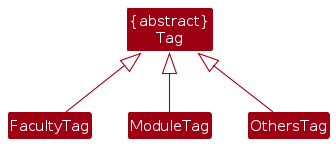
- The different tag categories are implemented as subclasses of an abstract
Tagclass. - When adding a new tag category, the following changes are recommended:
- Create a new subclass of
Tag. - Modify
src/main/resources/Base.css, adding a new CSS selector for a background color for the new tag with:#tags .label.tags-<NEW_TAG_CATEGORY>and#tagLegend .label.tag-<NEW_TAG_CATEGORY>. - Then, modify
MainWindow.java, adding a newTagCategoryLegendLabeltotagLegendto represent the new tag category.
- Create a new subclass of
- The recommended changes ensure that the new tag category is assigned a background color and displayed in the legend at the bottom of the Ui.
Undo/redo feature
Implementation
The undo/redo mechanism is facilitated by VersionedAddressBook. It extends AddressBook with an undo/redo history, stored internally as an addressBookStateList and currentStatePointer. Additionally, it implements the following operations:
VersionedAddressBook#commit(Comparator<Person>)-- Saves a copy of the current address book state and its sort order in its history, if either differs from the current saved state.VersionedAddressBook#undo()-- Restores the previous address book state and its sort order from its history.VersionedAddressBook#redo()-- Restores a previously undone address book state and its sort order from its history.
Each saved state is a SavedState, which holds a copy of the address book and the comparator that it is sorted by. This is so that undoing a sort command restores the previous order.
These operations are exposed in the Model interface as Model#commit(), Model#undo() and Model#redo() respectively, together with Model#canUndo() and Model#canRedo(). Only the contacts and their sort order are saved in the history. Aliases are kept separately in AliasRegistry, so changes made with alias and delete_alias are not undone or redone.
LogicManager calls Model#commit() after every command that executes successfully, except undo and redo, which move through the history instead of adding to it. Individual commands do not need to commit, and a command that changes neither the contact list nor its sort order (e.g. list, find, theme or alias) does not save a new state.
Given below is an example usage scenario and how the undo/redo mechanism behaves at each step.
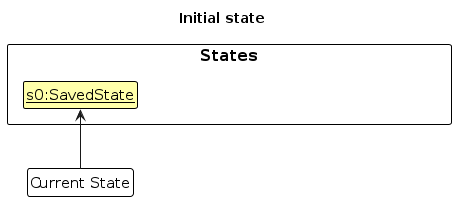
Step 1. The user launches the application. The VersionedAddressBook will be initialized with the initial address book state, and the currentStatePointer pointing to that single address book state.
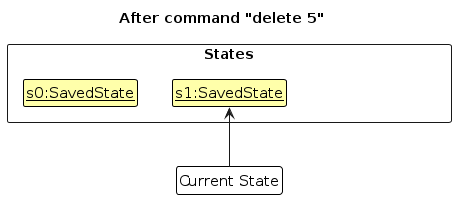
Step 2. The user executes delete 5 command to delete the 5th person in the address book. After the command executes, LogicManager calls Model#commit(). Since the address book has changed, its new state is saved in the addressBookStateList, and the currentStatePointer is shifted to the newly inserted address book state.
Step 3. The user executes add -n David … to add a new person. LogicManager calls Model#commit() again, causing another modified address book state to be saved into the addressBookStateList.
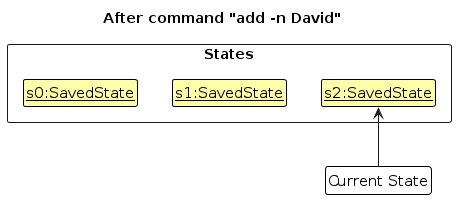
Note: If a command fails its execution, LogicManager will not call Model#commit(), so the address book state will not be saved into the addressBookStateList.
Step 4. The user now decides that adding the person was a mistake, and decides to undo that action by executing the undo command. The undo command will call Model#undo(), which will shift the currentStatePointer once to the left, pointing it to the previous address book state, and restores the address book to that state. The sort order saved with that state is also restored, and all contacts are shown.
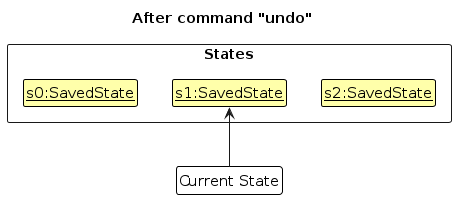
Note: If the currentStatePointer is at index 0, pointing to the initial AddressBook state, then there are no previous AddressBook states to restore. The undo command uses Model#canUndo() to check if this is the case. If so, it will return an error to the user rather
than attempting to perform the undo.
The following sequence diagram shows how an undo operation goes through the Logic component:
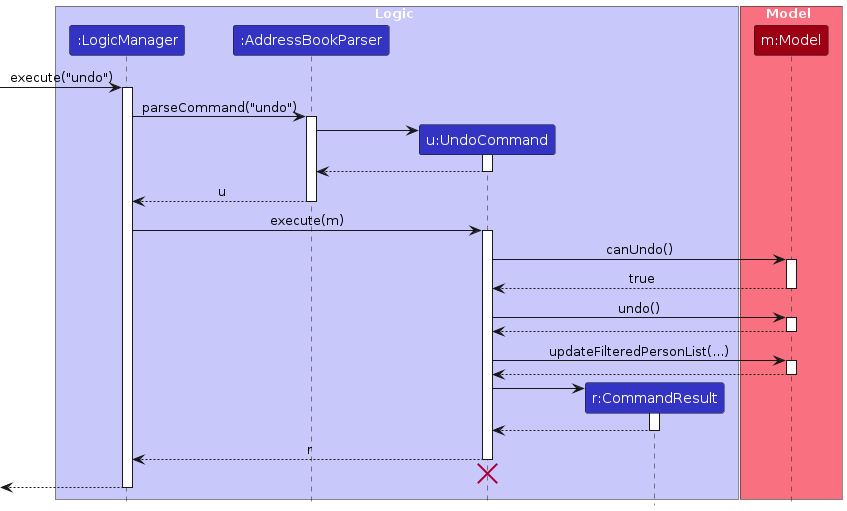
Note: The lifeline for UndoCommand should end at the destroy marker (X), but due to a limitation of PlantUML, it continues to the end of the diagram.
Similarly, how an undo operation goes through the Model component is shown below:
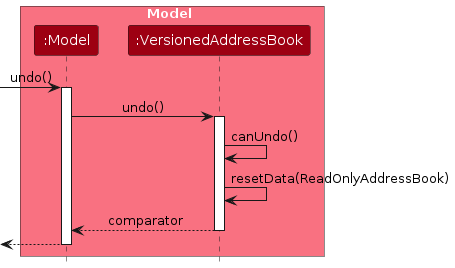
The redo command does the opposite — it calls Model#redo(), which shifts the currentStatePointer once to the right, pointing to the previously undone state, and restores the address book and its sort order to that state. Like undo, redo is not followed by a call to Model#commit().
Note: If the currentStatePointer is at index addressBookStateList.size() - 1, pointing to the latest address book state, then there are no undone AddressBook states to restore. The redo command uses Model#canRedo() to check if this is the case. If so, it will return an error to the user rather than attempting to perform the redo.
Step 5. The user then decides to execute the command list. LogicManager still calls Model#commit(), but since list does not change the address book, no state is saved. Thus, the addressBookStateList remains unchanged.
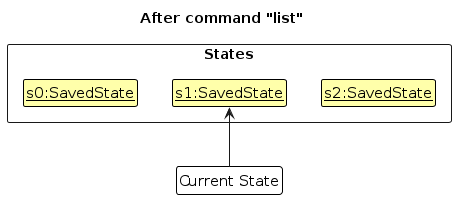
Step 6. The user executes clear, after which LogicManager calls Model#commit(). Since the currentStatePointer is not pointing at the end of the addressBookStateList, all address book states after the currentStatePointer will be purged. Reason: It no longer makes sense to redo the add -n David … command. This is the behavior that most modern desktop applications follow.
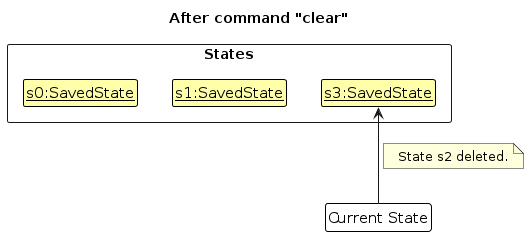
The following activity diagram summarizes what happens when a user executes a new command:
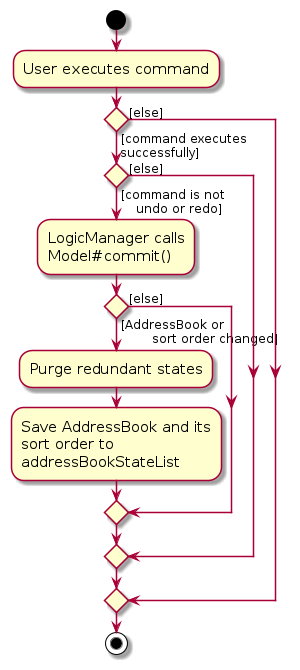
Design considerations:
Aspect: How undo & redo execute:
Alternative 1 (current choice): Saves the entire address book, together with its sort order.
- Pros: Easy to implement.
- Cons: May have performance issues in terms of memory usage.
Alternative 2: Individual command knows how to undo/redo by itself.
- Pros: Will use less memory (e.g. for
delete, just save the person being deleted). - Cons: We must ensure that the implementation of each individual command is correct.
- Pros: Will use less memory (e.g. for
Aspect: Where the address book state is saved:
Alternative 1 (current choice):
LogicManagercallsModel#commit()after every command exceptundoandredo, and a state is only saved if the address book or its sort order has changed.- Pros: New commands that change the contact list can be undone without extra code.
- Cons: The address book and its sort order are compared with the current saved state after every command.
Alternative 2: Each command that changes the contact list calls
Model#commit()itself.- Pros: No comparison is needed after each command.
- Cons: A developer may forget to call
Model#commit()in a new command, which then cannot be undone.
Documentation, logging, testing, dev-ops
Appendix: Requirements
Product scope
Target user profile:
- student from National University of Singapore (NUS).
- prefers desktop apps over other types of applications.
- can type at an average typing speed (45 WPM).
- have difficulty keeping track of friends met in NUS.
Value proposition: Our application enables one to maintain a list of their friends/acquaintances met from different parts of school -- friends from common CCAs, classes, different years, TAs.
User stories
Priorities: High (must have) - * * *, Medium (nice to have) - * *, Low (unlikely to have) - *
| Priority | As a … | I want to … | So that I can… |
|---|---|---|---|
* * * | Regular user | Create a contact | I can remember my friend's contact information |
* * * | Regular user | Delete a contact | I can remove unused contacts |
* * * | Regular user | Tag a contact | I can quickly figure out how this person is associated with me. |
* * * | Regular user | See all details of my contact | I can differentiate between friends with the same name |
* * | Beginner user | View a user guide/tutorial | I can get started using coNnectUS quickly |
* * | Beginner user | See friendly error messages | I can understand what I did wrong and correct them. |
* * | Forgetful user | Search for my contacts using any of their contexts | I can find my friend without remembering their name |
* * | Regular User | Update certain fields in contacts | I can reflect changes in contact information or correct mistakes |
* * | Regular user | Undo or redo my most recent changes | I can quickly recover from a mistake, such as deleting the wrong contact |
* * | Regular user | Group my contacts | I can find easily find friends with the same context |
* * | Regular user | Have added contacts automatically be saved | I don't have to worry about contacts not being saved |
* | Beginner user | Have sample contact information | I can explore features without having to add contacts |
* | Forgetful user | Have a guided command process | I need not remember all the syntax for the commands |
* | Lazy user | Search for my contacts with just parts of their name | I can lazily search for my friend's contact information |
* | Regular user | Toggle between dark/light mode | I can choose the UI style I like best |
* | Regular user | Export only selected contacts | I can share mutual contacts with others. |
* | Regular user | Import a contact | I don't have to enter all their details manually. |
* | Regular User | Contextualize my contacts (free text field) | I can recall where/how I met my friends |
* | Regular User | Sort my contacts | I can find my contacts more easily |
* | Regular User | Have favourite / most-frequented contacts | I can easily navigate to frequently-contacted contacts |
* | Regular User | Store and be reminded of regular meeting times with contacts | I don't forget to show up for them |
* | Expert user | Set aliases for the commands | I can customise the available command words to my liking |
* | Expert user | Delete all contacts with a certain tag | I can remove multiple contacts that are not needed easily. |
* | Expert user | Change the storage location for data files | I can store it at a location I can easily access |
Use cases
(For all use cases below, the System is coNnectUS and the Actor is the user, unless specified otherwise)
Use Case: UC01 - List Contacts
Actor: User
MSS:
User issues list command.
coNnectUS displays the list of saved contacts.
Use case ends.
Extensions:
- 1a. coNnectUS detects that the contact list is empty.
1a1. coNnectUS displays an error message indicating the need to populate the contact list.
Use case ends.
Use Case: UC02 - Add Contacts
Actor: User
MSS:
User adds contact with required contact information.
coNnectUS creates the new contact.
coNnectUS displays information of new contact and updated contact list.
Use case ends.
Extensions:
1a. coNnectUS detects invalid contact information.
1a1. coNnectUS displays an error message, detailing the issue with the user's command.
Use case resumes from Step 1.
1b. coNnectUS detects a duplicated contact (Shared phone number/email address).
1b1. coNnectUS displays an error message, indicating whether the phone number, email address or both are already used by another contact.
Use case ends.
Use Case: UC03 - Delete Contacts
Actor: User
MSS:
User views their list of current contacts (UC01).
User specifies delete command with a list index corresponding to a contact.
coNnectUS deletes the contact.
coNnectUS displays a status message with the information of the deleted contact, together with the updated contact list.
Use case ends.
Extensions:
1a. coNnectUS detects that the currently displayed contact list is empty (i.e. nothing to delete).
1a1. coNnectUS displays an error message informing the user about the empty contact list.
Use case ends.
2a. coNnectUS detects an illegal (i.e. missing, zero, negative or non-numeric) list index supplied.
2a1. coNnectUS displays an error message with the expected usage instructions
Use case resumes from Step 2.
2b. coNnectUS detects the positive index supplied is outside the currently displayed contact list.
2b1. coNnectUS displays an error message warning the user of the invalid index.
Use case resumes from Step 2.
Use Case: UC04 - Delete Multiple Contacts
Actor: User
MSS:
User specifies delete command with one or more tags to delete.
coNnectUS removes matching tags from all contacts and deletes contacts with no tags remaining.
coNnectUS displays the removed tags and, if any contacts were deleted, the number of deleted contacts.
Use case ends.
Extensions:
1a. coNnectUS detects that the address book is empty.
1a1. coNnectUS displays an error message informing the user about the empty contact list.
Use case ends.
1b. coNnectUS detects that an invalid tag was entered.
1b1. coNnectUS displays an error message with the expected usage instructions.
Use case resumes from Step 1.
1c. coNnectUS detects that there are no matching instances of the tag.
1c1. coNnectUS displays a status message informing the user that no matching contacts were found.
Use case ends.
Use Case: UC05 - Find Contacts
Actor: User
MSS:
User searches for a contact using any of its fields.
coNnectUS returns a list containing the contacts matching all the fields provided.
Use case ends.
Extensions:
1a. coNnectUS detects that no contacts match all the fields provided.
1a1. coNnectUS displays a message informing the user that no contacts were found.
Use case resumes at step 1.
1b. coNnectUS detects that no fields were provided.
1b1. coNnectUS displays an invalid command format message with the expected usage instructions.
Use case resumes at step 1.
1c. coNnectUS detects duplicates of fields other than tags were provided.
1c1. coNnectUS displays a warning message of the duplicated fields.
Use case resumes at step 1.
1d. coNnectUS detects that an unknown field was entered.
1d1. coNnectUS displays a warning message of the unknown field being entered.
Use case resumes at step 1.
Use Case: UC06 - Edit Contacts
Actor: User
MSS
User views their list of current contacts (UC01).
User requests to edit a specific contact in the list, providing new values for one or more fields.
coNnectUS updates the contact with the new values and shows the updated details.
Use case ends.
Extensions:
2a. The given index is invalid (e.g. the list is empty or the index is outside the displayed list).
2a1. coNnectUS shows an error message.
Use case resumes at step 2.
2b. No fields to edit are provided.
2b1. coNnectUS shows an error message stating that at least one field must be provided.
Use case resumes at step 2.
2c. One or more of the new values are invalid (e.g. a wrongly formatted phone number or email).
2c1. coNnectUS shows an error message stating the valid format for that field.
Use case resumes at step 2.
2d. The same field is provided more than once (e.g. two names).
2d1. coNnectUS shows an error message listing the repeated fields.
Use case resumes at step 2.
2e. The new phone number or email is the same as that of another contact already in the list.
2e1. coNnectUS shows an error message stating whether the phone number, email address or both are already used by another contact.
Use case resumes at step 2.
2f. User provides new tags.
2f1. coNnectUS replaces all of the contact's existing tags with the new tags.
Use case resumes at step 3.
2g. User provides an empty tag field.
2g1. coNnectUS removes all of the contact's tags.
Use case resumes at step 3.
2h. User provides an empty address field.
2h1. coNnectUS removes the contact's address.
Use case resumes at step 3.
Use Case: UC07 - Clear contacts
Actor: User
MSS:
User specifies the command to clear the contact list.
coNnectUS removes all contacts and displays a success message to the user.
Use case ends.
Use Case: UC08 - Pin Contacts
Actor: User
MSS:
User views their list of current contacts (UC01).
User specifies the command to pin a contact, with an index corresponding to the contact to be pinned.
coNnectUS pins the contact, displaying the pinned contact above other unpinned contacts.
Use case ends.
Extensions:
2a. coNnectUS detects an illegal or missing list index (e.g. List index is negative, zero, missing or non-numeric).
2a1. coNnectUS displays an error message informing the user of the correct usage of pin command.
Use case resumes at Step 2.
2b. coNnectUS detects an out-of-bounds index (e.g. Currently displayed list has n contacts, user specifies index of n + 1).
2b1. coNnectUS displays an error message informing the user that the provided index is invalid.
Use case resumes at Step 2.
2c. coNnectUS detects that the contact at the user-specified index is already pinned.
2c1. coNnectUS displays an error message informing the user that the contact is already pinned.
Use case ends.
Use case: UC09 - Unpin contacts
Actor: User
The use case for UC09 is mostly identical to (UC08), where the user unpins a pinned contact as opposed to them pinning an unpinned contact.
- When unpinned, the contact will be displayed amongst other unpinned contacts, below any remaining pinned contacts.
Use case: UC10 - Sort contacts
Actor: User
MSS:
User specifies the command to sort contacts, with a sorting criterion and sorting order.
coNnectUS sorts the contacts and displays a success message.
Use case ends.
Extensions:
- 1a. coNnectUS detects that an invalid sorting criterion or an invalid sorting order was specified.
1a1. coNnectUS displays an error message informing the user that the command was specified incorrectly and show sort command's usage.
Use case resumes at Step 1.
Use Case: UC11 - Create an alias
Actor: User
MSS:
User requests to register an alias for a specified built-in command word.
coNnectUS registers the alias for the specified command word and notifies the user that it was successfully registered.
Use case ends.
Extensions:
1a. coNnectUS detects that the registration request has an invalid format (e.g. missing arguments or too many arguments).
1a1. coNnectUS displays an error message informing the user of the invalid command format, followed by the command's usage instructions.
Use case resumes at Step 1.
1b. coNnectUS detects that the supplied alias contains characters other than lowercase or uppercase ASCII letters.
1b1. coNnectUS displays an error message informing the user that the alias must contain only the allowed ASCII letters (i.e.
a-zorA-Z).Use case resumes at Step 1.
1c. coNnectUS detects that an unsupported command word has been supplied (e.g. wrong case for an existing command word, an existing alias or an undefined command word).
1c1. coNnectUS displays an error message informing the user that the supplied command word supplied is unknown.
Use case resumes at Step 1.
1d. coNnectUS detects that the supplied alias conflicts with a built-in command word, ignoring case.
1d1. coNnectUS displays an error message informing the user of a conflict with the existing command word.
Use case resumes at Step 1.
1e. coNnectUS detects that the alias supplied is already registered, using a case-sensitive comparison.
1e1. coNnectUS displays an error message informing the user about the existing alias.
Use case resumes at Step 1.
Use Case: UC12 - List available aliases
Actor: User
MSS:
User requests to view all registered aliases.
coNnectUS displays the aliases and their corresponding built-in command words, grouped by command word.
Use case ends.
Extensions:
- 1a. coNnectUS detects that no aliases are currently registered.
1a1. coNnectUS displays an error message informing the user that there are no currently registered aliases.
Use case ends.
Use Case: UC13 - Delete an alias
Actor: User
MSS:
User views their list of available aliases (UC12).
User requests to delete an alias by specifying its name.
coNnectUS deletes the specified alias and notifies the user about its successful deletion.
Use case ends.
Extensions:
2a. coNnectUS detects that the deletion request has an invalid format (e.g. the alias is missing or the request has too many arguments).
2a1. coNnectUS displays an error message informing the user about the invalid command format, followed by the command's usage instructions.
Use case resumes at Step 2.
2b. coNnectUS detects that the supplied alias contains characters other than lowercase or uppercase ASCII letters.
2b1. coNnectUS displays an error message informing the user that aliases must contain only the allowed ASCII letters (
a-zorA-Z).Use case resumes at Step 2.
2c. coNnectUS detects that the supplied alias name does not match any registered alias, using a case-sensitive comparison.
2c1. coNnectUS displays an error message informing the user that the alias was not previously registered.
Use case resumes at Step 2.
Use Case: UC14 - Undo a change
Actor: User
MSS:
User requests to undo the most recent change to the contacts or their sort order.
coNnectUS restores the contacts and their sort order to the state before that change, and displays a success message.
Use case ends.
Extensions:
- 1a. coNnectUS detects that there are no changes to undo (e.g. no change has been made since the app was started, or all changes have already been undone).
1a1. coNnectUS displays an error message informing the user that there are no changes to undo.
Use case ends.
Use Case: UC15 - Redo an undone change
Actor: User
Preconditions: User has undone a change (UC14).
MSS:
User requests to redo the most recently undone change.
coNnectUS reapplies the change to the contacts or their sort order, and displays a success message.
Use case ends.
Extensions:
- 1a. coNnectUS detects that there are no undone changes to redo (e.g. a new change to the contacts or their sort order was made after the undo, or all undone changes have already been redone).
1a1. coNnectUS displays an error message informing the user that there are no undone changes to redo.
Use case ends.
Use Case: UC16 - Export Contacts
Actor: User
MSS:
User specifies the
exportcommand with a filename and optional contact filtering criteria.coNnectUS identifies all contacts matching every specified criterion.
coNnectUS saves all matching contacts to a JSON file with the user-specified file name.
coNnectUS displays a success message indicating the exported filename.
Use case ends.
Extensions:
1a. User does not provide a filename.
1a1. coNnectUS displays an error message with the correct command format and usage instructions.
Use case resumes from Step 1.
1b. User provides an invalid filename.
1b1. coNnectUS displays an error message explaining the filename requirements.
Use case resumes from Step 1.
1c. User provides an invalid, unknown parameter.
1c1. coNnectUS displays an error message indicating that an unknown export parameter has been provided.
Use case resumes from Step 1.
2a. No contacts match all the specified criteria.
2a1. coNnectUS displays a message indicating that no matching contacts were found.
Use case resumes from Step 1.
3a. coNnectUS is unable to create or write to the export file.
3a1. coNnectUS displays an error message indicating that the file could not be saved.
Use case ends.
Use Case: UC17 - Import Contacts
Actor: User
MSS:
User specifies the
importcommand with the path to a JSON address book file.coNnectUS reads the contacts from the specified file.
coNnectUS merges the imported contacts into the current address book, retaining existing contacts and skipping imported contacts that share an existing phone number or email address.
coNnectUS displays the number of imported contacts and skipped duplicates.
Use case ends.
Extensions:
1a. User does not provide a file path.
1a1. coNnectUS displays an error message with the correct command format and usage instructions.
Use case resumes from Step 1.
1b. User provides an invalid command format or unknown parameter.
1b1. coNnectUS displays an error message indicating that the parameter is either unknown, or cannot be specified more than once.
Use case resumes from Step 1.
2a. The specified file cannot be read, as it cannot be found.
2a1. coNnectUS displays an error message indicating that the file was not found.
Use case resumes from Step 1.
2b. The specified file cannot be read due to insufficient permissions.
2b1. coNnectUS displays an error message indicating that the file cannot be read.
Use case ends.
2c. The specified file is not a valid address book JSON file.
2c1. coNnectUS displays an error message indicating that the file format is invalid.
Use case resumes from Step 1.
Non-Functional Requirements
- Should work without an internet connection.
- Should store data locally in a human-editable text file.
- Able to operate with 1000 contacts saved without sluggish performance.
- Should work on any mainstream OS with Java 25 installed.
- A user who is capable of an average typing speed of 45 WPM should be able to accomplish most tasks faster by typing commands than by using the mouse.
- Besides Java 25, users should not require additional installations.
- Error messages should be descriptive such that a well-intentioned user does not make the same mistake more than twice in a row.
- GUI should be functional and not cause interruptions to the user at most standard screen resolutions (e.g. 1920 x 1080).
Glossary
- Alias: A user-defined, case-sensitive alternative command word that invokes a built-in coNnectUS command.
- Alphanumeric: Consisting of letters (A–Z, a–z) and digits (0–9), without spaces or special characters.
- ASCII (American Standard Code for Information Interchange): A character-encoding standard containing 128 characters, including letters, digits, punctuation, and control characters.
- (Built-in) command word: A predefined, case-sensitive keyword that identifies a supported command in coNnectUS, such as
add,find, ordelete. - Case-sensitive / Case-insensitive: Whether uppercase and lowercase letters are treated as different. For example, case-sensitive matching distinguishes
ffromF. - CLI (Command Line Interface): A way to interact with an application by typing commands.
- Command: The string of words you enter in order to make use of a feature of the program.
- (Command-line) Parameters/Arguments/Fields: The input that you add into commands.
- (Command) Switch: An argument modifier added to a command to change how it behaves.
- Comparator: An object that determines the ordering of contacts. coNnectUS uses comparators to keep pinned contacts first and apply the selected sorting criterion and order.
- Context: Where/how a user of coNnectUS met the corresponding contact.
- Domain Name: Refers to a human-readable string used to visit a website.
- Export: Create a data file that contains a number of contacts specified by the user.
- Filtered Contact List: The contacts currently selected for display by the active filter, such as search results. List indices refer to positions in this displayed list.
- GUI: Graphical User Interface / User Interface. Refers to the visual elements with which you interact with to use the program.
- Home Folder: The folder containing the coNnectUS JAR, where the app’s data and preference files are stored.
- Import: Using information from an existing data file to create contacts previously specified.
- JAR (Java Archive): The
.jarfile used to distribute and launch coNnectUS. - JSON (JavaScript Object Notation): A text-based data format used to store coNnectUS contacts, command aliases and user preferences, and to import and export contacts.
- List Index: The item’s position in the contact list. This always begins at
1. - Mainstream OS: Windows, Linux, Unix, or macOS.
- Pinned Contact: A contact marked to appear above unpinned contacts. Any selected sorting criterion is applied within the pinned and unpinned groups.
- Prefix: A command token that identifies the field supplied by the following value, such as
-nfor a name or-tfor a tag. - Substring: A continuous sequence of characters within a larger string. For example,
Johnis a substring ofJohnny. - Special Characters: Symbols on your keyboard that are not alphanumeric.
- Tag: A string label attached to a contact item, as a means to identify attributes related to the contact or group contacts with similar associations.
- Tag Category: The type of a tag:
module,facultyorothers. A tag is specified using both its category and its name.
Appendix: Instructions for manual testing
Given below are instructions to test the app manually.
Note: These instructions only provide a starting point for testers to work on; testers are expected to do more exploratory testing.
Launch and shutdown
Initial launch
Download the JAR file and copy it into an empty folder.
Double-click the JAR file.
Expected: The GUI opens with a set of sample contacts. The window size may not be optimal.
Saving window preferences
Resize the window to an optimal size. Move the window to a different location. Close the window.
Relaunch the app by double-clicking the JAR file.
Expected: The most recent window size and location are retained.
Changing the theme
Test case:
theme light
Expected: The window turns white and the theme button shows "Light".Test case:
theme blue
Expected: The theme does not change. An error message shows the correct format.Click the theme button, close the app, then relaunch it.
Expected: The app opens in the theme that was last selected.
Adding a contact
Adding a contact with valid values
Prerequisites: Launch the app with the sample contacts.
Test case:
add -n Jane Tan -p 87654321 -e janetan@example.com
Expected: A new contact, Jane Tan, is added to the bottom of the list, without an address. The status message shows that she has been added, together with her details.Test case:
add -n John Doe -p 98765432 -e johnd@example.com -a John street, block 123, #01-01 -t module CS2103T -t others friend
Expected: John Doe is added with the address and both tags. The status message shows that he has been added, together with his details.Test case:
add -n Alex Yeoh -p 81234567 -e alexyeoh2@example.com
Expected: A second Alex Yeoh is added, since names do not need to be unique.
Adding a contact with a phone number or email address that is already used
Prerequisites: Launch the app with the sample contacts.
Test case:
add -n Amy Lee -p 87438807 -e amylee@example.com
Expected: No contact is added, as the phone number is already used by Alex Yeoh. The status message shows that the phone number is already used by another contact.Test case:
add -n Amy Lee -p 81111111 -e alexyeoh@example.com
Expected: No contact is added, as the email address is already used by Alex Yeoh. The status message shows that the email address is already used by another contact.Test case:
add -n Amy Lee -p 87438807 -e berniceyu@example.com
Expected: No contact is added, as the phone number is already used by Alex Yeoh and the email address is already used by Bernice Yu. The status message shows that the phone number and email address are already used by existing contacts.
Adding a contact with invalid values
Test cases:
add,add -n Amy Lee -e amylee@example.com
Expected: No contact is added. An error message shows the command syntax and sample usage.Test case:
add -n Amy Lee -p 12 -e amylee@example.com
Expected: No contact is added. An error message shows that phone numbers should be between 3 and 15 digits long.Test case:
add -n Amy Lee -p 81111111 -e amylee@example.com -t club chess
Expected: No contact is added. An error message shows that the specified tag category is unsupported and lists the supported categories.Test case:
add -n Amy1 -p 81111111 -e amylee@example.com
Expected: No contact is added. An error message shows that names should only contain letters and spaces, and should start with a letter.Test case:
add -n Amy Lee -p 81111111 -e amylee
Expected: No contact is added. An error message shows the constraints for valid email addresses.Test case:
add -n Amy Lee -p 81111111 -p 82222222 -e amylee@example.com
Expected: No contact is added. An error message shows that-pis supplied more than once, which is not allowed since a contact can only have one phone number.
Editing a contact
Editing a contact with valid values
Prerequisites: List all contacts using the
listcommand, with multiple contacts in the list. There should be no contact using the phone number9000123456orbobby@gmail.com. The contact at index1should have an address.Test case:
edit 1 -n Bob
Expected: The name of the contact at index1is now set toBob.Test case:
edit 1 -p 9000123456
Expected: The phone number of the contact at index1is now set to9000123456.Test case:
edit 1 -e bobby@gmail.com
Expected: The email address of the contact at index1is now set tobobby@gmail.com.Test case:
edit 1 -a
Expected: The contact at index1now has no address as it has been cleared by the command.
Editing a contact to use a phone number or email address that is already used by another contact
Prerequisites: List all contacts using the
listcommand, with multiple contacts in the list. Add a contact with phone number91234567and email addressbob@gmail.com. The contact at index1should not be using the phone number91234567or the email addressbob@gmail.com.Test case:
edit 1 -p 91234567
Expected: The contact at index1is unmodified as the phone number91234567is already used by another contact. An error message is displayed, warning that the phone number is already used by another contact.Test case:
edit 1 -e bob@gmail.com
Expected: The contact at index1is unmodified as the email addressbob@gmail.comis already used by another contact. An error message is displayed, warning that the email address is already used by another contact.
Editing a contact with invalid values
Prerequisites: List all contacts using the
listcommand, with multiple contacts in the list.Test case:
edit 1 -n Marie123
Expected: The contact at index1is unmodified as the nameMarie123is invalid. An error message is displayed, showing that names should only contain letters and spaces, and should start with a letter.Test case:
edit 1 -p +1-123-456-1234
Expected: The contact at index1is unmodified as the phone number+1-123-456-1234is invalid. An error message is displayed, describing the accepted values for phone numbers.Test case:
edit 1 -e bob@@gmail..com
Expected: The contact at index1is unmodified as the email addressbob@@gmail..comis invalid. An error message is displayed, describing the accepted values for email addresses.Test case:
edit
Expected: No contacts are modified. The command is rejected and an error message is displayed, describing the correct usage for the edit command.Test case:
edit 1
Expected: The contact at index1is unmodified. The command is rejected and an error message is displayed, warning that a field must be specified for the edit operation.Test case:
edit 1 -p 91234567 -p 90001234
Expected: The contact at index1is unmodified as the-pprefix is supplied twice. An error message is displayed, warning about the violation.
Pinning and Unpinning contacts
Pinning and then unpinning the same contact
Prerequisites: List all contacts using the
listcommand, with multiple contacts in the list. Ensure that none of them are currently pinned.Test case:
pin 2
Expected: The second contact in the list now appears above other unpinned contacts, with a red pin icon attached.Test case:
unpin 1
Expected: The contact at index1is now unpinned and the red pin icon is removed. The contact may still appear at position 1, but is no longer pinned.
Selected contact is already pinned or unpinned
Prerequisites: List all contacts using the
listcommand, with pinned and unpinned contacts in the list.Test case:
pin 1, where the contact at index1is pinned
Expected: The contact at index1is not modified and an error message is returned, stating that the selected contact is already pinned.Test case:
unpin 3, where the contact at index3is unpinned
Expected: The contact at index3is not modified and an error message is returned, stating that the selected contact is already unpinned.
Sorting contacts
Sorting contacts using the supported sorts
Prerequisites: List all contacts using the
listcommand, with multiple contacts in the list and none of them are pinned.Test case:
sort name asc
Expected: Contacts are now ordered by their name in ascending alphabetical order (A-Z).Test case:
sort name desc
Expected: Contacts are now ordered by their name in descending alphabetical order (Z-A).Test case:
sort NaMe DeSc
Expected: Sorting criteria and order are case-insensitive. Contacts are now ordered by their name in descending alphabetical order (Z-A).
Sorting with pinned contacts in the contact list
Prerequisites: List all contacts using the
listcommand, with pinned and unpinned contacts in the list.Test case:
sort name asc
Expected: Pinned contacts still appear above unpinned contacts. Pinned and unpinned contacts are ordered by their name in ascending alphabetical order (A-Z).Test case:
sort name desc
Expected: Pinned contacts still appear above unpinned contacts. Pinned and unpinned contacts are ordered by their name in descending alphabetical order (Z-A).
Attempting to sort with unsupported sorts
Test case:
sort tag asc
Expected: No sorts are applied and an error message is displayed, describing the correct command usage and currently supported sorts.Test case:
sort name
Expected: No sorts are applied and an error message is displayed, describing the correct command usage and currently supported sorts.
Tagging a contact
Adding a contact with tags
Test case:
add -n Bobby -e Bobby@gmail.com -p 91234567 -t others Friend -t module CS2103
Expected: A contact namedBobbyis created with 2 tags, anotherstag with the tag nameFriendand amoduletag with the tag nameCS2103.Test case:
add -n Alice -e Alice@gmail.com -p 98765432 -t others friend -t others friend -t others FrIeNd
Expected: A contact namedAliceis created with 1 tag, anotherstag with the tag namefriend, due to case-insensitive deduplication of tags.Test case:
add -n Charlie -e Char@gmail.com -p 97538642 -t others 1 + 1 = 2
Expected: No contacts are created. An error message is displayed, describing the accepted values for tag names.Test case:
add -n Charlie -e Char@gmail.com -p 97538642 -t others tag1 -t others tag2 -t others tag3 -t others tag4 -t others tag5 -t others tag6
Expected: No contacts are created. An error message is displayed, warning that a contact should not have more than 5 tags.
Editing an existing contact
Prerequisites: List all contacts using the
listcommand, with at least one contact in the list.Test case:
edit 1 -t others friend
Expected: The contact at index1now has only anotherstag with the tag namefriend. Any other tags prior to runningeditare removed.Test case:
edit 1 -t, where the contact at index1already has tags.
Expected: The contact at index1now has no tags. Other properties are unmodified.Test case:
edit 1 -t others tag1 -t others tag2 -t others tag3 -t others tag4 -t others tag5 -t others tag6
Expected: The contact at index1is not modified. An error message is displayed, warning that a contact should not have more than 5 tags.
Deleting a contact
Deleting a contact while all contacts are being shown
Prerequisites: List all contacts using the
listcommand, with multiple contacts in the list.Test case:
delete 1
Expected: The first contact is deleted from the list. The status message shows the deleted contact's details.
Invalid inputs
Test case:
delete 0
Expected: No contact is deleted. An error message stating that the list index must be a positive integer is shown, together with thedeletecommand format and sample usage.Test case:
delete INDEX_OUT_OF_RANGE(whereINDEX_OUT_OF_RANGEis any integer larger than the current list size)
Expected: No contact is deleted. An error message stating that the list index is invalid is shown.
Deleting a contact by tags
Deleting a contact when tags are present
Prerequisites: Add the following three contacts, running each command separately. The expected results assume no other contacts have matching tags.
add -n Aaron Tan -p 82345671 -e aarontan@example.com -t others Friend
add -n Beth Lim -p 82345672 -e bethlim@example.com -t others Friend -t module CS3000
add -n Chloe Lee -p 82345673 -e chloelee@example.com -t faculty CDE -t module Friend
Test case:
delete -t others Friend
Expected: Aaron Tan is deleted. Beth Lim remains, with the others tagFriendremoved. Chloe Lee is not affected by this command. A status message shows that one contact was deleted, and all instances of others tagFriendare removed.Test case:
delete -t faculty cde
Expected: Only Chloe Lee's contact information is affected, with the faculty tagCDEbeing removed. This shows that the tag-name matching is case-insensitive. A status message shows that all instances of faculty tagcdeare removed.
Invalid inputs
Test case:
delete -t CS3000
Expected: An error message stating that a valid tag category and tag name are required is shown, together with thedeletecommand format and sample usage.Test case:
delete -n others Friend
Expected: An error message stating that-nis an unknown delete parameter is shown.
Finding a contact
Finding a contact when the contact list is populated
Prerequisites: Clear the contact list using
clear, then add only the following three contacts, running each command separately.add -n Alice Tan -p 81234561 -e alicetan@example.com -t others Friend add -n Alice Lim -p 81234562 -e alexlim@example.com -t others Colleague add -n Alex Lee -p 81234563 -e alexlee@example.com -t others FriendTest case:
find -n alice
Expected: Alice Tan and Alice Lim are displayed in the contact list. The status message indicates that 2 contacts were found.Test case:
find -t others friend -e alex
Expected: Only Alex Lee is displayed, as this contact matches both criteria. Alice Tan matches only the tag criterion, while Alice Lim matches only the email criterion, so they are not included in the output. The status message indicates that one contact was found.Test case:
find -p 9200
Expected: A status message indicates that no contacts were found, and an empty list is displayed.
Invalid inputs
Test case:
find alice
Expected: An error message stating thataliceappears before the first parameter is shown, together with thefindcommand format and sample usage. To search by name, usefind -n alice.Test case:
find -a -t faculty Science
Expected: An error message stating that the field for-acannot be empty is shown, together with thefindcommand format and sample usage.
Undoing and redoing changes
Undoing and redoing a change
Prerequisites: Launch the app with multiple persons in the list.
Test case:
delete 1, thenundo
Expected: The deleted contact is back in the list. All contacts are shown, with pinned contacts at the top.Test case:
delete 1,undo, thenredo
Expected: The contact is deleted again.Test case:
delete 1,list, thenundo
Expected:listis skipped, and the deleted contact is back in the list.Test case:
sort name asc,sort phone desc,undo, thenadd -n Zack Lim -p 99999999 -e zack@example.com
Expected: Afterundo, the contacts are sorted by name again. Zack Lim is placed in name order (at the bottom of the sample data), not by phone number (at the top of the unpinned contacts), since the name order is restored.
Nothing to undo or redo
Test case: Relaunch the app, then
undo
Expected: The contact list does not change. The status message shows that there are no changes to undo.Test case:
delete 1,undo,delete 2, thenredo
Expected: The contact list does not change, sincedelete 2cleared the redo history. The status message shows that there are no undone changes to redo.
Adding and using aliases
Registering and using aliases
Prerequisites: Launch the app with multiple contacts. Use
list_aliasto check that no aliases have been registered at this point. If not, delete them usingdelete_alias ALIAS_TO_DELETE.Test case:
alias find f, thenlist_alias
Expected: A success message confirms the registration. The alias list showsfregistered to thefindcommand.Test case:
f -n Alex, thenfind -n Alex
Expected: Both commands show contacts whose names matchAlex(if any). The originalfindcommand remains usable.Test case:
f
Expected: An error message shows the correct format forfind. Using an alias still requires the original command's parameters.Test case:
alias list ls, then executels
Expected: All available contacts are shown.Test case:
alias list F, executeFand thenf -n Alex
Expected:Fshows all available contacts, whilef -n Alexfilters contacts by name, withFandfbeing distinct aliases.Test case: Close the app with
exitand relaunch it, then enterlist_alias.
Expected: The registered aliases are retained, since aliases are persisted across sessions.
Rejecting invalid registrations
Prerequisites: Keep
fregistered tofindfrom the previous tests.Test case:
alias list f
Expected: An error message states thatfalready exists. Its mapping tofindis unchanged and is persisted in storage (i.e.aliases.json)Test case:
alias find LIST
Expected: An error message states that the alias conflicts with a built-in command word.Test cases:
alias FIND search,alias f search
Expected: Each command is rejected because the target command must be an existing lowercase built-in command word.Test cases:
alias find f1,alias find 搜索
Expected: None of the alias creation commands are successful. The error message informs the users aliases may only contain lowercase and uppercase ASCII letters in both test cases.Test cases:
alias,alias find,alias find two words
Expected: None of the alias creation commands are successful. An error message shows the correct syntax of the command and sample usage instructions.
Deleting aliases
Deleting an alias and checking case sensitivity
Prerequisites: Ensure that you only have two entries —
fis registered tofindandFis registered tolist. A listing of the current aliases usinglist_aliasshould match the output below. Otherwise, delete and/or add the necessary aliases to set up the mappings as required.Registered alias(es): find: f list: FTest case:
delete_alias f, thenlist_alias
Expected: A message that confirms alias deletion. Notice thatfis no longer available, whileFremains registered tolist.Test case:
f -n Alex, thenfind -n AlexandF
Expected: The first command is rejected as unknown because the alias had previously been removed. The other two commands continue to be executed successfully:findstill filters contacts andFstill displays all contacts.Test case: Close and relaunch the app, then enter
f -n Alex.
Expected:fis rejected as an unknown command as its successful deletion is persisted in the alias data file.Test case:
alias list f, thenf
Expected: The deleted alias can now be registered to a different command.fshows all contacts after being registered as a new alias.
Rejecting invalid deletions
Prerequisites: Remove the alias
fif it is still registered, and keepFregistered tolist. Thelist_aliasoutput should look like:Registered alias(es): list: FTest case:
delete_alias f
Expected: An error message states thatfwas not previously registered.Test cases:
delete_alias,delete_alias f F
Expected: No aliases are removed as the number of arguments supplied is incorrect. An error message shows the correct syntax of the command and sample usage instructions.